
Plane Mode Tweaker0.5 - Get APK
You'll be able to download in few seconds.
Publisher Description
**This app has very limited functionality past Android 2.3 because of Google's changes to Android. The only option available for most users past Android 2.3 is the trigger that turns WiFi off when toggling on airplane mode.
Different devices will have different behavior, as I do not have the resources to test this workaround on every device. **
If you hate it when your Wi-Fi and Bluetooth get disabled by turning on airplane mode, here your fix!
Perfect for turning an old smartphone into a dedicated MP3 player or PDA. Just take out the SIM, use this app, and leave the phone in airplane mode.
Completely free with no ads
Once the settings in this app have been applied you can safely remove this application - they are written to your system settings and are permanent until a factory reset.
# Warning
May not work on all devices!
Some manufacturers have locked down some of these settings, rending this application useless in some cases. I have no way around this, nor can I tell which devices specifically with which firmwares do not support the functionality in this app, unfortunately.
Known not to work in Android 4.2 because Google has made airplane mode settings 'read-only' when accessing them from third-party apps.
# Permissions used
* write system settings - that's what this app does...
# How to use this app
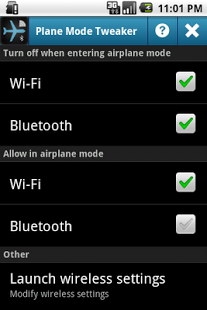
Choose the options you want enabled or disabled in this application. Your changes will take place immediately.
You can view the changes in Android's settings application, typically under 'Wireless Settings'. Wireless settings can be launched directly from the bottom item in this application for your convenience.
Example Use Case 1:
Allow toggling of Wi-Fi and Bluetooth when airplane mode is enabled, but still have airplane mode toggle Wi-Fi and Bluetooth off ->
on, on, on, on
Example Use Case 2:
Make Wi-Fi and Bluetooth toggling independent of airplane mode ->
off, off, on, on
Example Use Case 3:
Don't let Wi-Fi and Bluetooth toggle when airplane mode is enabled, and toggle them off when airplane mode is enabled ->
on, on, off, off
When launching wireless settings, your changes may not be visible right away. In this case, hit the 'Back' button on the device or kill the 'Settings' app with a task killer. Your changes will be reflected upon a new restart of the wireless settings task.
# What this does
When airplane mode is enabled, the default behavior is to disable the 'radios' on the device. That would include your cell radio, Wi-Fi, and Bluetooth.
A good app to go with your backup Android device to reduce extend battery life.
Using hidden functionality built into Android, this application does one of two things:
1) Prevent airplane mode from toggling your Wi-Fi or Bluetooth radios.
(This also has the effect of allowing your Wi-Fi and Bluetooth to stay on after reboots when airplane mode has been enabled.)
2) Allow Wi-Fi and Bluetooth to be toggled when airplane mode is enabled.
(No longer possible past Android 4.0)
# More Notes
Your settings should persist after you reboot your device. Feel free to remove this application to free up some space when you are done with it.
The default manufacturer setting varies depending on the device. As a result, this app may not prove to be of use to every device.
# Keywords
Wi-Fi, Bluetooth, airplane mode, flight mode, system tool
About Plane Mode Tweaker
The company that develops Plane Mode Tweaker is Chislon Chow. The latest version released by its developer is 0.5.
To install Plane Mode Tweaker on your Android device, just click the green Continue To App button above to start the installation process. The app is listed on our website since 2013-06-08 and was downloaded 0 times. We have already checked if the download link is safe, however for your own protection we recommend that you scan the downloaded app with your antivirus. Your antivirus may detect the Plane Mode Tweaker as malware as malware if the download link to com.wordpress.chislonchow.airplanemodetweak is broken.
How to install Plane Mode Tweaker on your Android device:
- Click on the Continue To App button on our website. This will redirect you to Google Play.
- Once the Plane Mode Tweaker is shown in the Google Play listing of your Android device, you can start its download and installation. Tap on the Install button located below the search bar and to the right of the app icon.
- A pop-up window with the permissions required by Plane Mode Tweaker will be shown. Click on Accept to continue the process.
- Plane Mode Tweaker will be downloaded onto your device, displaying a progress. Once the download completes, the installation will start and you'll get a notification after the installation is finished.
Program Details
System requirements
Download information
Pricing
Version History
version 0.5
posted on 2013-06-08
Several fixes and updates
version 0.5
posted on 2013-06-08
No additional features. More rules to hide non-functioning toggles from users of Android 4.x.
Disclaimer
External Download
We do not host Plane Mode Tweaker on our servers. We did not scan it for viruses, adware, spyware or other type of malware. This app is hosted by Galad and passed their terms and conditions to be listed there. We recommend caution when installing it.
The APK Download link for Plane Mode Tweaker is provided to you by apps112.com without any warranties, representations or guarantees of any kind, so access it at your own risk.
If you have questions regarding this particular app contact the publisher directly. For questions about the functionalities of apps112.com contact us.
